For as long as I remember, I have had some sort of TV at my house. Most of the time, it was cable, but even when I was a college student, and couldn’t afford cable, I still had regular broadcast TV.
For the past 5 or 6 years now, I’ve had Cable, DirecTV, you name it, I had it. In the recent months, I’ve been looking at TV, and wondering why I pay close to $65 / month for programming that I rarely watch. Then I thought back, and realized that I only had TV for a few shows that I watch on a regular basis. Could not justify the cost. So I went on the hunt for my TV shows online to see if it’s possible to make the switch.
The search was really not hard at all. With the help of a bunch of articles from Lifehacker, I had a good idea on where to find shows. My first stop was Hulu.com which has 90% of the shows I watch. The rest, I found them on ABC, which Hulu already has links to. Not too bad. Now I had the problem with switching from my 42” Plasma TV to my 17” MacBookPro, so I went again on the hunt to find some solutions for that. It wasn’t long before I stumbled on Plexapp.com and Boxee.tv. These happened to be applications that have quite a lot of online content, consolidated into one nice application, which also includes my music (iTunes) libraries, as well as my photo (iPhoto) libraries in it. Those, in addition to quite a few sources for online content.
I decided to try both Plex, and Boxee, and keeping my opinion short on this, since this article isn’t quite about these apps: I’d have to say, I love the concept, though they still have a lot of room to grow, the functionality is still unstable, though they’re heading in the right direction. I especially love the remote control software they wrote for these applications. Namely, Rowmote, and Boxee Remote for the iPhone.
That said, I decided to stick it out with Boxee and see where they take me. Of course, there was the ordeal with Hulu dropping Boxee as a content provider, which was a bummer, but we still have (for now), the Hulu feeds on Boxee.
Now that I have access to all the stuff online, I realized that I’m having trouble keeping up with my shows. I came from a spoiled DVR world, where I used to turn on my TV, and see what was just recorded and watch it. Now, I have to know when these shows air, so that I can catch the online episode, which actually doesn’t get posted until after the show airs. Having to go through all the shows every day to see what has recently aired proved just too much work. So once again, I headed out to our friends at Lifehacker, and I found this great site called, Crap, I missed it!. I know the name sound pretty funny, but it’s quite a useful site. it’s almost like an on-demand scheduler that I have on the DVR, only free.. Nice!
So I went and searched for the shows I watch, and created email notifications for them to be delivered to my mailbox! Yay, now I don’t have to worry about what’s playing when. I just look at my latest “Crap, I missed it!” email, and know what show is playing next, and I can watch it on Boxee.
Another little nifty trick, was to grab the RSS feed of all the subscriptions I have on there, and dump them on my NetVibes page. Now that… is sweet!
I do have to admit, that I’m having slight withdrawals by not having the DVR, but with the new setup, it only takes a little bit of getting used to, before having a great experience.
Now one more cost will be involved in this, and that is to purchase a dedicated Media PC/Mac to be connected to my Media center.
Have you made the switch from cable yet? how’s your experience with it? what are tricks and ways you’ve set yourself up for it? Share in the comments.


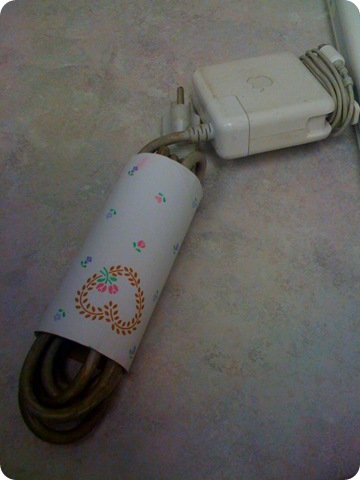 I was just about to leave work today, and one of the helpdesk ladies brought over an old iBook for repair. she put it on the table and left, I didn’t pay any attention to it, until I was packing up to leave work, and I glanced at the power supply, only to see the cable wrapped in something I had never seen before. well… I had seen it, just not in this context. It’s either that I’m way behind the times, and most people already know this, or, I’m sharing a new idea with someone who’s always frustrated with their laptop cable being all over the place in your laptop bag.