Monday, March 30, 2009

Skype for iPhone is now available!

Capture 2 Today (03/31/2009) Skype released their iPhone app. I was quick to go and download it. I had heard some stuff about it. Some was true, some I had misunderstood, and now that I have the app, all is clear.

Here are a couple of things that I noticed:

The interface is very similar to the desktop version of Skype, has the same logon sound, and feels very similar in the navigation.

  • There was some talk about Skype for iPhone not having text messaging. This is where I had some confusion, I had thought that the chat feature wasn’t available in the iPhone version, turns out to be that SMS text messaging isn’t available. I heard a lot of people complain about that, though I’m not sure that it’s a big deal, given there are other methods to sending text message via the phone (through email, for instance).
  • The chat was very fast, even on my Edge network. I had all my history of that chat pop up (I was also logged in on my laptop). The profile of the user is viewable, and basic actions like “blocking” a user are also available.
  • Trying to make a Skype call the Edge / 3G network was a no-go. Apparently this is something related to the agreement of data usage with the carrier or something to that effect. The message is detailed when it comes up on Skype will connected to Edge or 3G
  • Skype calls were very crisp and clear on WiFi though. I love the fact that it can be used on both the speaker phone as well as the phone ear piece.

Given all I’ve seen at first glance, I’m very impressed with Skype for iPhone. It’s quite stable for a first release. I haven’t had a single crash yet, and connectivity is fast. Also, my SkypeOut balance is available, and can extend my credit straight from my iPhone. Same goes for my voicemail account as well.

If you’re an iPhone owner, then Skype is definitely an app you want to download. best of all, it’s free… can’t beat that price!

Thursday, March 19, 2009

The switch from cable TV to internet TV

For as long as I remember, I have had some sort of TV at my house. Most of the time, it was cable, but even when I was a college student, and couldn’t afford cable, I still had regular broadcast TV.

For the past 5 or 6 years now, I’ve had Cable, DirecTV, you name it, I had it. In the recent months, I’ve been looking at TV, and wondering why I pay close to $65 / month for programming that I rarely watch. Then I thought back, and realized that I only had TV for a few shows that I watch on a regular basis. Could not justify the cost. So I went on the hunt for my TV shows online to see if it’s possible to make the switch.

The search was really not hard at all. With the help of a bunch of articles from Lifehacker, I had a good idea on where to find shows. My first stop was Hulu.com which has 90% of the shows I watch. The rest, I found them on ABC, which Hulu already has links to. Not too bad. Now I had the problem with switching from my 42” Plasma TV to my 17” MacBookPro, so I went again on the hunt to find some solutions for that. It wasn’t long before I stumbled on Plexapp.com and Boxee.tv. These happened to be applications that have quite a lot of online content, consolidated into one nice application, which also includes my music (iTunes) libraries, as well as my photo (iPhoto) libraries in it. Those, in addition to quite a few sources for online content.

I decided to try both Plex, and Boxee, and keeping my opinion short on this, since this article isn’t quite about these apps: I’d have to say, I love the concept, though they still have a lot of room to grow, the functionality is still unstable, though they’re heading in the right direction. I especially love the remote control software they wrote for these applications. Namely, Rowmote, and Boxee Remote for the iPhone.

That said, I decided to stick it out with Boxee and see where they take me. Of course, there was the ordeal with Hulu dropping Boxee as a content provider, which was a bummer, but we still have (for now), the Hulu feeds on Boxee.

Now that I have access to all the stuff online, I realized that I’m having trouble keeping up with my shows. I came from a spoiled DVR world, where I used to turn on my TV, and see what was just recorded  and watch it. Now, I have to know when these shows air, so that I can catch the online episode, which actually doesn’t get posted until after the show airs. Having to go through all the shows every day to see what has recently aired proved  just too much work. So once again, I headed out to our friends at Lifehacker, and I found this great site called, Crap, I missed it!. I know the name sound pretty funny, but it’s quite a useful site. it’s almost like an on-demand scheduler that I have on the DVR, only free.. Nice!

So I went and searched for the shows I watch, and created email notifications for them to be delivered to my mailbox! Yay, now I don’t have to worry about what’s playing when. I just look at my latest “Crap, I missed it!” email, and know what show is playing next, and I can watch it on Boxee.

Another little nifty trick, was to grab the RSS feed of all the subscriptions I have on there, and dump them on my NetVibes page. Now that… is sweet!

I do have to admit, that I’m having slight withdrawals by not having the DVR, but with the new setup, it only takes a little bit of getting used to, before having a great experience.

Now one more cost will be involved in this, and that is to purchase a dedicated Media PC/Mac to be connected to my Media center.

Have you made the switch from cable yet? how’s your experience with it? what are tricks and ways you’ve set yourself up for it? Share in the comments.

Thursday, March 12, 2009

Cable Management DIY

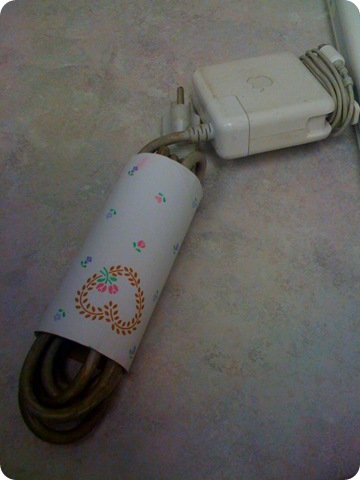
-1I was just about to leave work today, and one of the helpdesk ladies brought over an old iBook for repair. she put it on the table and left, I didn’t pay any attention to it, until I was packing up to leave work, and I glanced at the power supply, only to see the cable wrapped in something I had never seen before. well… I had seen it, just not in this context. It’s either that I’m way behind the times, and most people already know this, or, I’m sharing a new idea with someone who’s always frustrated with their laptop cable being all over the place in your laptop bag.

As I looked closer at the concoction, I noticed that it’s the toilet paper roll cardboard holder. you can tell it’s a lady that created that one, since it has some girly design on it, but your imagination is the limit on what you could print out and stick on the roll, to make it look uber cool!

I’m not sure how sturdy it is, and how long it’ll last before it starts tearing apart, but honestly, who cares, when you print the first design for the first roll, print 5 more copies, and I’m sure you won’t have a problem finding the toilet paper roll thingies :)

Monday, March 9, 2009

Texter, it’s a beautiful thing…

Texter is a sweet little utility that allows the text expansion.  There are many other products that do the same thing, though the cool thing about Texter is that it’s absolutely free, it has virtually no foot print and Picture 4works like a charm. ok, almost like a charm. This app has been published by our friends at Lifehacker. you can find some more information about it, and download it from here.

Now to my problem, and to anyone that has seen this, and may have a solution for it, for some reason, every so often, especially when I’m using some Remote Desktop software, i.e: vRD 2009, I get a sweet little error message that looks like this:

Picture 1

Hmm, so perhaps it’s some variable that vRD is setting that is conflicting with the %Bank% variable. I’m not sure. when this error happens, Texter is still alive, though not really functional, I’d have to relaunch it.

So, what’s the solution to that, if any? ideas? thoughts? comments?

Wednesday, March 4, 2009

The question of wireless profiles on laptops with new users

This post is a bit more of a technical nature…so if you casually read my blog, this may fly over your head :)

I was at work today, and a very interesting question came up from one of my colleagues… here’s the scenario:

We have a couple of laptop carts in some labs in the schools, and these laptops are to be used by students who have their individual Active Directory logins. These laptops connect primarily with a Wireless connection.

Given:

  • We know that that in order to connect to a network account, you need a network connections.
  • We know that a wireless profile on a computer is profile based, not machine based.

Problem:

In order for a user to have a wireless connection, they need to have a profile, and in order to create the profile, you need a network connection. The verdict: it’s a catch 22!

Workaround:

There’s always the possibility to connect the laptop to a wired connection in order to login for the first time to the computer. However, given that there are hundreds of students, and each of those students may very well grab a different laptop each time they visit the lab, there will be a constant plugging, unplugging, questions, confusions, you get the idea…

Ideal Solution:

Have a wireless profile setup in Windows Group Policy to allow for the wireless setup automatically on the machine: That’s a great idea IF:

  • All the machines logging in have Windows XP Service Pack 3
  • If the servers on which the GPO resides have Windows 2003 servers or higher . (Windows Server 2008 and Vista natively have this functionality, and no schema changes would be required for them.)
  • If the servers have Windows 2003, that you are willing to make some changes to the Active Directory schema, following the instructions in this article: http://technet.microsoft.com/bb727029 , that’s pretty high risk if you ask me.

My Workaround:

The following is a theory at this point, as I haven’t implemented it, though I have pretty high confidence that I can bring it to fruition.

1- Setup a Default profile that's configured with the appropriate Wireless configuration 2- Create a local, no privilege account on the laptop with no password or a very simple password. 3- Place a batch-file and/or other script that launches on login, that asks the user for their network login and password: The batch file/script will contain a routine to trigger some process that will "RUN AS..." that user, therefore, triggering the creation of that user's profile on that workstation using the default profile which contains the wireless configuration, and then logs off. 4- Now the user can logon with their network account, to which the default profile has been copied, and the Wireless configuration has been applied. 5- (Optional) Enable the GPO to wait for login until network connectivity has been established.

I will post a follow up to this post if and when I decide to implement this solution. What do you think about this workaround? do you have any better ideas to implement wireless configuration for non-logged on users aside from the GPO method?